OAuth Platform Authentication
Learn how to authenticate e-commerce platforms (Etsy, TikTok Shop, Amazon) using OAuth 2.0.
Overview
Dodgeprint uses OAuth 2.0 to securely connect your account with e-commerce platforms. This allows you to deploy products and manage listings without sharing your platform credentials.
Supported Platforms:
- ✅ Etsy - Full support with custom redirect URLs
- ✅ TikTok Shop - Full support with custom redirect URLs (via
custom_field_value) - ✅ Amazon Seller (SP-API) - Custom redirect URLs supported; Dodgeprint appends
platform=amazon&site_id=<id>on success - ✅ Amazon Ads (Advertising API) - Custom redirect URLs supported; callback includes
segment=advertisingto distinguish from the Seller track. See the Amazon Integration Guide.
Authentication Flow
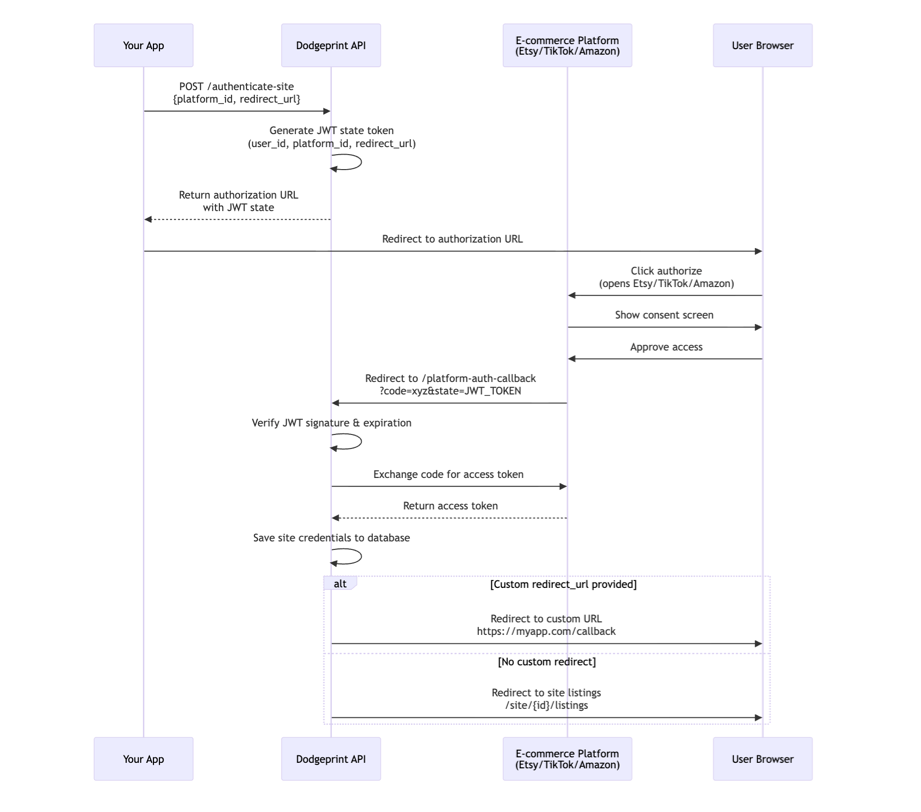
Step-by-Step Process
- Request Authorization URL - Your app requests an OAuth URL from Dodgeprint
- User Authorization - User clicks the URL and authorizes on the platform
- Callback Processing - Platform redirects back with authorization code
- Token Exchange - Dodgeprint exchanges code for access token
- Site Creation - Connected site is created and ready to use
Quick Start
1. Get Authorization URL
curl -X POST "$DODGEPRINT_API/authenticate-site" \
  -H "Authorization: Bearer $DODGEPRINT_TOKEN" \
  -H "X-Workspace-Id: $DODGEPRINT_WORKSPACE_ID" \
  -H "Content-Type: application/json" \
  -d '{
    "platform_id": 1,
    "redirect_url": "https://myapp.com/oauth/callback"
  }'
Response:
{
  "success": true,
  "data": {
    "url": "https://www.etsy.com/oauth/connect?client_id=xxx&state=eyJhbGc..."
  }
}
2. Redirect User to Authorization URL
// Example: JavaScript redirect
window.location.href = response.data.url;
3. Handle Redirect (Optional)
If you provided a redirect_url, the user will be redirected back to your app after authorization:
Success:
https://myapp.com/oauth/callback
Error:
https://myapp.com/oauth/callback?authorization_error=Invalid+credentials
Platform-Specific Examples
Etsy Authentication
Etsy supports custom redirect URLs for seamless integration.
curl -X POST "$DODGEPRINT_API/authenticate-site" \
  -H "Authorization: Bearer $DODGEPRINT_TOKEN" \
  -H "X-Workspace-Id: $DODGEPRINT_WORKSPACE_ID" \
  -H "Content-Type: application/json" \
  -d '{
    "platform_id": 1,
    "redirect_url": "https://myapp.com/etsy/success"
  }'
What happens:
- User clicks returned URL → Opens Etsy OAuth page
- User approves access → Etsy processes authorization
- Redirects to your app →
https://myapp.com/etsy/success
TikTok Shop Authentication
TikTok uses a special authorization_url parameter and supports custom redirects via custom_field_value.
curl -X POST "$DODGEPRINT_API/authenticate-site" \
  -H "Authorization: Bearer $DODGEPRINT_TOKEN" \
  -H "X-Workspace-Id: $DODGEPRINT_WORKSPACE_ID" \
  -H "Content-Type: application/json" \
  -d '{
    "platform_id": 4,
    "authorization_url": "https://services.tiktokshop.com/open/authorize?service_id=7360336",
    "custom_field_value": "https://myapp.com/tiktok/callback"
  }'
You can append tracking parameters to custom_field_value using semicolons:
"custom_field_value": "https://myapp.com/callback;utm_source=tiktok;campaign=launch"
Amazon Authentication
Amazon has two OAuth tracks under the same platform_id=5, distinguished by whether site_id is included. Both tracks support redirect_url with a unified query contract:
| Track | Body | Success callback |
|---|---|---|
| Seller (SP-API) | { "platform_id": 5 } | <redirect_url>?platform=amazon&site_id=<new_site_id> |
| Ads (Advertising API) | { "platform_id": 5, "site_id": <seller_site_id> } | <redirect_url>?platform=amazon&site_id=<site_id>&segment=advertising |
On failure (Seller only, since Ads failures surface as a retry): <redirect_url>?platform=amazon&code=<err_code>&message=<url_encoded_msg>.
You must connect Seller first, then call this endpoint again with the returned site_id to connect Ads.
# ✅ Seller track with custom redirect
curl -X POST "$DODGEPRINT_API/authenticate-site" \
  -H "Authorization: Bearer $DODGEPRINT_TOKEN" \
  -H "X-Workspace-Id: $DODGEPRINT_WORKSPACE_ID" \
  -H "Content-Type: application/json" \
  -d '{
    "platform_id": 5,
    "redirect_url": "https://myapp.com/amazon/callback"
  }'
# ✅ Ads track with the same custom redirect
curl -X POST "$DODGEPRINT_API/authenticate-site" \
  -H "Authorization: Bearer $DODGEPRINT_TOKEN" \
  -H "X-Workspace-Id: $DODGEPRINT_WORKSPACE_ID" \
  -H "Content-Type: application/json" \
  -d '{
    "platform_id": 5,
    "site_id": 6529,
    "redirect_url": "https://myapp.com/amazon/callback"
  }'
You can reuse one callback handler for both tracks — switch on the segment query parameter:
app.get('/amazon/callback', (req, res) => {
  const { site_id, code, message, segment } = req.query;
  if (code) return res.status(400).send(`Amazon OAuth failed: ${decodeURIComponent(message)}`);
  return segment === 'advertising'
    ? res.redirect(`/dashboard/sites/${site_id}?view=ads`)     // Ads connected
    : res.redirect(`/dashboard/sites/${site_id}`);             // Seller connected
});
For the full Amazon flow — Seller OAuth → Ads OAuth → marketplace selection → sync → orders, ledgers, campaigns, solicitations — see the Amazon Integration Guide.
Platform Comparison
| Platform | Platform ID | Custom Redirect | Parameter | Notes |
|---|---|---|---|---|
| Etsy | 1 | ✅ Yes | redirect_url | Direct URL string |
| TikTok Shop | 4 | ✅ Yes | custom_field_value | URL or URL;metadata |
| Amazon Seller | 5 | ✅ Yes | redirect_url | Callback appended with ?platform=amazon&site_id=<id> |
| Amazon Ads | 5 + site_id | ✅ Yes | redirect_url + site_id | Callback appended with ?platform=amazon&site_id=<id>&segment=advertising |
Security Features
JWT-Signed State Tokens
All OAuth state parameters use JWT (JSON Web Tokens) for security:
- ✅ Tamper-proof - Cryptographically signed with server secret key
- ✅ Auto-expire - 15-minute expiration prevents replay attacks
- ✅ CSRF protection - Random token ID per request
- ✅ Encrypted payload - User ID, workspace ID, redirect URL encoded
Example State Token:
eyJhbGciOiJIUzI1NiIsInR5cCI6IkpXVCJ9.eyJ1c2VyX2lkIjoyMjMsInBsYXRmb3JtX2lkIjoxLCJ3cF9pZCI6MzU5LCJyZWRpcmVjdF91cmwiOiJodHRwczovL215YXBwLmNvbS9jYWxsYmFjayIsImlhdCI6MTIzNDU2Nzg5MCwiZXhwIjoxMjM0NTY4NzkwLCJqdGkiOiJ1bmlxdWUtdG9rZW4taWQifQ.signature
Traditional OAuth implementations use simple random strings for state parameters. Dodgeprint uses JWT to provide cryptographic proof that the state hasn't been tampered with and automatically expires after 15 minutes for enhanced security.
Error Handling
Common Errors
Expired State Token (15 minutes):
Error: "Authorization state has expired. Please try authenticating again."
Redirect: {redirect_url}?authorization_error=Authorization+state+has+expired
Invalid Signature:
Error: "Invalid authorization state. Please try authenticating again."
Redirect: {redirect_url}?authorization_error=Invalid+authorization+state
Error Response Format
All errors follow this structure:
{
  "success": false,
  "code": 400,
  "message": "Human-readable error description"
}
When redirecting with errors, the message is URL-encoded:
https://myapp.com/callback?authorization_error=Invalid+credentials
Redirect URL Behavior
Priority Order
Dodgeprint determines where to redirect users after authentication using this priority:
- Custom redirect URL (if provided and platform supports)
- Site listings page
/site/{id}/listings(if site was created successfully) - Dashboard
/dashboard(fallback)
URL Validation Rules
All custom redirect URLs must:
✅ Start with https:// or http:// (HTTPS recommended for production)
✅ Be a valid URL format
✅ Not contain pipe | character (reserved for legacy state format)
Valid Examples:
https://myapp.com/oauth/callback
https://app.example.com/auth/success?source=dodgeprint
https://myapp.com/callback;utm_source=etsy;campaign_id=123
Invalid Examples:
myapp.com/callback              # ❌ Missing protocol
http://myapp|invalid            # ❌ Contains pipe character
javascript:alert(1)             # ❌ Invalid protocol
Best Practices
Security
- ✅ Always use HTTPS for redirect URLs in production
- ✅ Validate state tokens if you're handling callbacks directly
- ✅ Handle expired tokens gracefully with retry logic
- ✅ Never expose sensitive data in redirect URLs
- ✅ Implement rate limiting on your authentication endpoints
User Experience
- ✅ Show loading state while redirecting to OAuth provider
- ✅ Provide clear instructions before redirecting ("You will be redirected to Etsy...")
- ✅ Handle errors gracefully with user-friendly messages
- ✅ Redirect to meaningful pages after successful auth (not generic dashboard)
- ✅ Implement retry mechanism for transient failures
Development
- ✅ Test all three platforms before deploying to production
- ✅ Use test credentials in development environment
- ✅ Log OAuth flows for debugging (without exposing tokens)
- ✅ Handle platform-specific quirks (TikTok uses
authorization_url; Amazon Ads callback includessegment=advertising— dispatch on it to separate from Seller) - ✅ Monitor token expiration in your logs
Complete Integration Example
Here's a complete example integrating OAuth authentication in your application:
// 1. Request authorization URL from Dodgeprint
async function authenticatePlatform(platformId, customRedirectUrl) {
  try {
    const response = await fetch(`${DODGEPRINT_API}/authenticate-site`, {
      method: 'POST',
      headers: {
        'Authorization': `Bearer ${DODGEPRINT_TOKEN}`,
        'X-Workspace-Id': DODGEPRINT_WORKSPACE_ID,
        'Content-Type': 'application/json'
      },
      body: JSON.stringify({
        platform_id: platformId,
        redirect_url: customRedirectUrl
      })
    });

    const data = await response.json();

    if (!data.success) {
      throw new Error(data.message);
    }

    return data.data.url;
  } catch (error) {
    console.error('OAuth error:', error);
    throw error;
  }
}

// 2. Initiate OAuth flow
async function connectEtsyStore() {
  try {
    // Show loading state
    showLoading('Connecting to Etsy...');

    // Get authorization URL
    const authUrl = await authenticatePlatform(1, 'https://myapp.com/etsy/callback');

    // Redirect user to Etsy
    window.location.href = authUrl;
  } catch (error) {
    hideLoading();
    showError('Failed to connect Etsy: ' + error.message);
  }
}

// 3. Handle callback on your server/app
// URL: https://myapp.com/etsy/callback
function handleOAuthCallback() {
  const urlParams = new URLSearchParams(window.location.search);
  const error = urlParams.get('authorization_error');

  if (error) {
    // Show error to user
    showError(`Authentication failed: ${decodeURIComponent(error)}`);
  } else {
    // Show success message
    showSuccess('Etsy store connected successfully!');

    // Redirect to site listings or dashboard
    window.location.href = '/sites';
  }
}
Testing
Test with Internal User
Use the provided test credentials:
# Internal User (User ID: 223)
export DODGEPRINT_TOKEN="eyJ0eXAiOiJKV1QiLCJhbGciOiJIUzI1NiJ9..."
export DODGEPRINT_WORKSPACE_ID="359"
export DODGEPRINT_API="http://127.0.0.1:8010/api/v1"

# Test Etsy OAuth
curl -X POST "$DODGEPRINT_API/authenticate-site" \
  -H "Authorization: Bearer $DODGEPRINT_TOKEN" \
  -H "X-Workspace-Id: $DODGEPRINT_WORKSPACE_ID" \
  -H "Content-Type: application/json" \
  -d '{"platform_id": 1, "redirect_url": "https://myapp.com/callback"}'
Test Scenarios
- ✅ Etsy with custom redirect - Success flow
- ✅ Etsy without redirect - Default fallback
- ✅ TikTok with custom_field_value - Success flow
- ✅ TikTok with tracking params - Semicolon-separated metadata
- ✅ Amazon Seller with
redirect_url- Success; callback receivesplatform=amazon&site_id=<id> - ✅ Amazon Ads with
redirect_url- Success; callback receivesplatform=amazon&site_id=<id>&segment=advertising - ❌ Expired JWT state - Error redirect with message
- ❌ Invalid platform_id - Validation error
Related Resources
- API Reference: POST /authenticate-site
- Platform Setup: Sites Management
- Product Deployment: Deploy Products
Troubleshooting
"Authorization state has expired"
Cause: JWT token expired (15-minute limit) Solution: Request a new authorization URL and try again
Amazon callback handler can't tell Seller from Ads apart
Symptom: One callback URL receives both Seller and Ads redirects; handler routes to the wrong page.
Cause: Both tracks hit the same redirect_url with platform=amazon&site_id=<id>. The Ads track additionally appends &segment=advertising.
Solution: Dispatch on the segment query parameter — if present and equals advertising, treat as Ads; otherwise treat as Seller.
User stuck on platform authorization page
Cause: User didn't complete authorization or clicked "Deny" Solution: Ask user to try again and ensure they click "Allow/Authorize"
Callback never triggered
Cause: Incorrect callback URL configuration in platform settings Solution: Verify callback URL is configured correctly in Etsy/TikTok/Amazon app settings
Last Updated: 2025-11-03 Need Help? Contact support or check the API Reference