Product Deployment Guide
This guide walks you through deploying products to Etsy, TikTok Shop, and Amazon using the Dodgeprint API.
Quick overview
Dodgeprint exposes two deployment endpoints:
| Endpoint | Platforms | Mode | Response |
|---|---|---|---|
POST /v2/deploy-products | Etsy (platform_id=1), TikTok (4) | Sync | 200 OK with listing URL |
POST /v2/amazon/deploy-products | Amazon Seller (platform_id=5) | Async (RFC 7231 LRO) | 202 Accepted + Location + Retry-After |
Etsy, TikTok Shop, Amazon Seller, Shopify (platform_id=6).
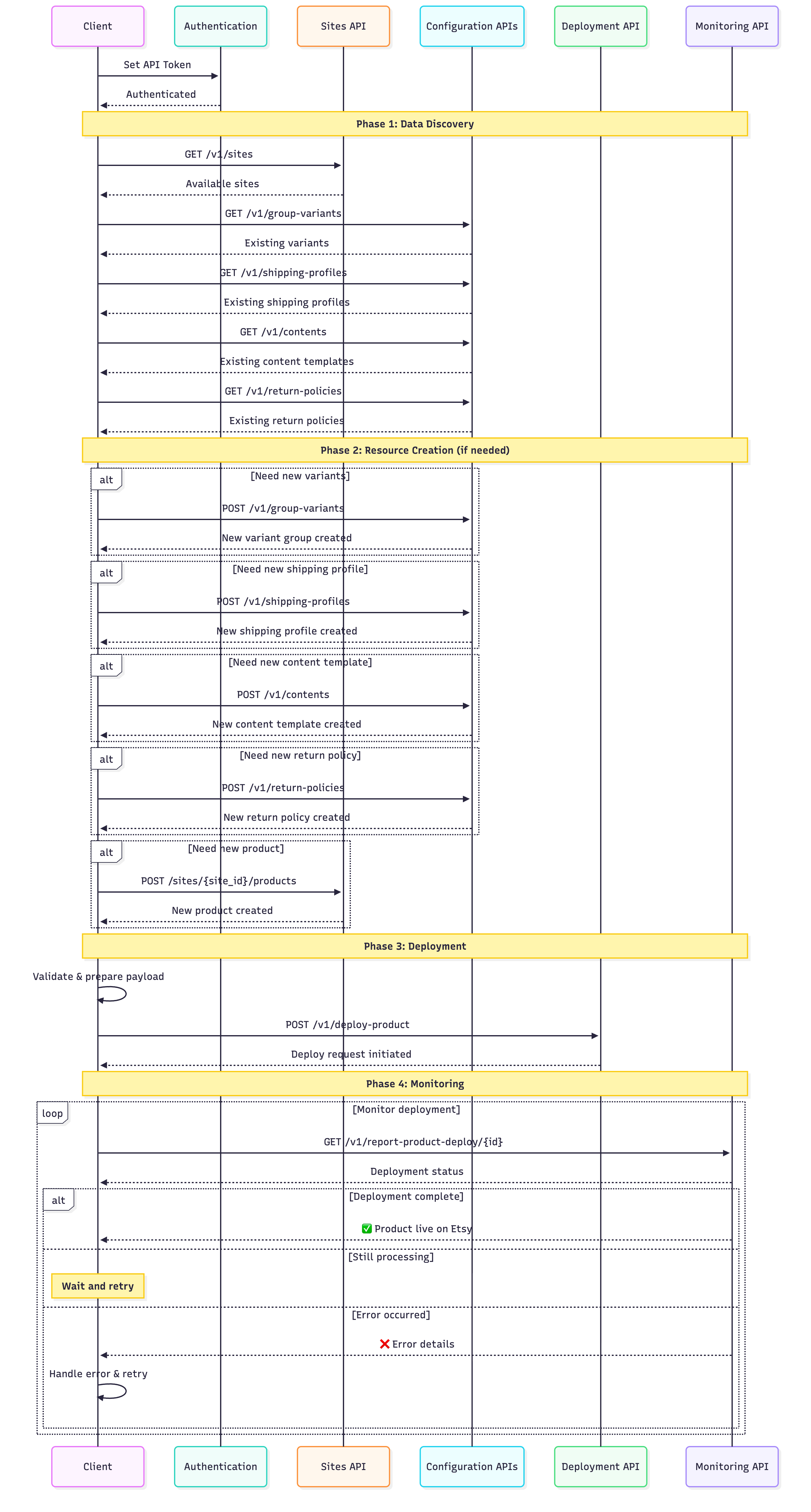
Deployment workflow
Follow this phase-to-phase workflow to successfully deploy your products:
Platform requirements
Each platform requires different fields in the deploy payload.
Etsy requirements (platform_id=1)
| Field | Required | Description |
|---|---|---|
platform_id | ✅ Yes | 1 for Etsy |
site_id | ✅ Yes | Connected Etsy site from GET /sites?platform_id=1 |
type | ✅ Yes | "insert" |
product_id | Conditional | Required unless title + images are provided (auto-create mode) |
title | Conditional | Required when auto-creating a new product |
images | Conditional | 1-10 items; required when auto-creating |
description | Recommended | HTML supported, max 5000 chars |
variants or group_variant_id | ✅ Yes | Either inline variants[] or a saved variant group ID |
category_id | Conditional | Required when using inline variants[] (Etsy taxonomy ID as integer) |
shipping_profile_id | ✅ Yes | From GET /shipping-profiles — auto-converts to Etsy origin ID |
return_policy_id | ✅ Yes | From GET /return-policies — auto-converts to Etsy origin ID |
processing_profile_id | ✅ Yes | From GET /processing-profiles — required for physical products |
when_made | Optional | Enum: made_to_order, 2020_2024, 2010_2019, 2000_2009, 1990_1999, 1980_1989, 1970_1979, before_1970 |
who_made | Optional | Enum: i_did, collective, someone_else |
is_supply | Optional | Is this a craft supply? (boolean) |
tags | Optional | Max 13 tags, 20 chars each |
materials | Optional | Max 13 items, 45 chars each |
shop_section_id | Optional | From GET /sections — auto-converts to Etsy origin ID |
content_id | Optional | Description template ID from GET /contents |
sku_origin | Optional | Custom SKU (auto-generated if omitted) |
Complete Etsy payload
{
  "type": "insert",
  "platform_id": 1,
  "site_id": 6529,
  "product_id": 1635986,
  "description": "<p>Beautiful handcrafted canvas print.</p>",
  "category_id": 2197,
  "variants": [
    {
      "price": 45.99,
      "quantity": 100,
      "sku": "CANVAS-24X36-BLK",
      "options": [
        { "name": "Size",  "value": "24x36 inch" },
        { "name": "Color", "value": "Black" }
      ]
    },
    {
      "price": 35.99,
      "quantity": 150,
      "options": [
        { "name": "Size",  "value": "18x24 inch" },
        { "name": "Color", "value": "White" }
      ]
    }
  ],
  "shipping_profile_id": 6811,
  "return_policy_id": 5,
  "processing_profile_id": "1742858595",
  "tags": ["Canvas Print", "Wall Art", "Custom"],
  "when_made": "made_to_order",
  "who_made": "i_did",
  "is_supply": false,
  "shop_section_id": 28745001
}
Key points:
variants[]is flat. Each entry carriesprice,quantity, andoptions[{name, value}](max 2 dimensions on Etsy).category_idis an integer — not the legacy nestedcategory.id/taxonomy_idshape.- Alternative: pass
group_variant_idinstead of inlinevariants[]to reuse a saved variant group. when_made/who_made/is_supplyare accepted but optional on the Dodgeprint side (server applies Etsy-compliant defaults). Pass them explicitly if Etsy rejects your default category.
TikTok Shop requirements (platform_id=4)
| Field | Required | Description |
|---|---|---|
platform_id | ✅ Yes | 4 for TikTok |
site_id | ✅ Yes | Connected TikTok site |
content_id | ✅ Yes | Content template ID — required for TikTok |
warehouses | ✅ Yes | Warehouse identifier (e.g., WAREHOUSE_US) |
variants or group_variant_id | ✅ Yes | Product variants with prices and quantities |
Complete TikTok payload
{
  "type": "insert",
  "platform_id": 4,
  "site_id": 7832,
  "product_id": 1635986,
  "content_id": 2414,
  "warehouses": "WAREHOUSE_US",
  "variants": [
    {
      "price": 45.99,
      "quantity": 100,
      "options": [
        { "name": "Size",  "value": "24x36 inch" },
        { "name": "Color", "value": "Black" }
      ]
    }
  ]
}
Key points:
content_idis required (unlike Etsy where it's optional).warehousesmust match your TikTok Shop warehouse settings.- TikTok has strict content guidelines — ensure descriptions comply.
Amazon requirements (platform_id=5)
Amazon uses a separate endpoint (POST /v2/amazon/deploy-products) and a different payload shape.
| Field | Required | Description |
|---|---|---|
site_id | ✅ Yes | Amazon Seller site from GET /sites?platform_id=5 |
product_id | ✅ Yes | Source product ID |
content_id | ✅ Yes | Required — description template ID from GET /contents |
product_type | ✅ Yes | Amazon product type code. Whitelisted to SHIRT, COAT today — discover via GET /product-type |
amazon_attributes | ✅ Yes | Listing attributes (Amazon Listings API 2021-08-01 shape) |
amazon_attributes.fulfillment_availability.lead_time_to_ship_max_days | ✅ Yes | Nested required |
amazon_attributes.fulfillment_availability.fulfillment_channel_code | ✅ Yes | Nested required (e.g., DEFAULT) |
bullet_points | ✅ Yes | Array of strings (or a single newline-separated string) — key feature bullets |
variants | Conditional | Optional, but when present must contain at least 1 item. Flat array; max 3 dimensions per variant. Omit to inherit variants from the source product_id. |
type | Optional | Defaults to insert. Values: insert, update, update_partial, update_variant, update_image, update_video, delete |
generic_keyword | Optional | Search keywords |
brands | Optional | Brand info with origin_id |
vendor | Optional | Vendor metadata |
shipping_package_template_id | Optional | Shipping package template |
- Field is
amazon_attributes(object) — not V1'sproduct_definitions. - Field is
bullet_points(plural, array of strings) — not V1'sbullet_point(singular). - Etsy-only fields
shipping_profile_id/return_policy_idare rejected by the Amazon endpoint.
Complete Amazon payload
{
  "type": "insert",
  "site_id": 9185,
  "product_id": 2479113,
  "content_id": 2,
  "product_type": "SHIRT",
  "amazon_attributes": {
    "brand":             { "language_tag": "en_US", "value": "MyBrand" },
    "country_of_origin": { "value": "US" },
    "fabric_type":       { "language_tag": "en_US", "value": "100% cotton" },
    "item_type_keyword": { "value": "Crew-neck shirt" },
    "department":        { "language_tag": "en_US", "value": "Unisex" },
    "condition_type":    { "value": "new_new" },
    "fulfillment_availability": {
      "lead_time_to_ship_max_days": "3",
      "fulfillment_channel_code":    "DEFAULT"
    }
  },
  "bullet_points": [
    "Inspirational quote print",
    "Premium cotton canvas",
    "Fade-resistant ink"
  ],
  "variants": [
    {
      "price": 44.99,
      "quantity": 40,
      "sku": "CANVAS-S-WHITE",
      "options": [
        { "name": "Size",  "value": "s" },
        { "name": "Color", "value": "White" }
      ]
    },
    {
      "price": 45.99,
      "quantity": 40,
      "sku": "CANVAS-M-WHITE",
      "options": [
        { "name": "Size",  "value": "m" },
        { "name": "Color", "value": "White" }
      ]
    }
  ],
  "generic_keyword": "cotton shirt casual unisex"
}
Key points:
amazon_attributesis pass-through to the Amazon Listings API — Dodgeprint enforces only thefulfillment_availabilitynested fields; everything else is validated by Amazon asynchronously.product_typeis whitelisted — if you passHOODIE,SHOES, etc., you'll get422with no further hint. Always callGET /product-type?platform_id=5first.variants[]is flat withoptions[{name, value}], max 3 dimensions.
Step-by-step instructions
Step 1: Get site ID
Retrieve the site ID for your connected e-commerce platform.
- Etsy:
platform_id=1 - TikTok:
platform_id=4 - Amazon:
platform_id=5 - Shopify:
platform_id=6
curl -X GET "https://api.dodgeprint.com/api/v1/sites?platform_id=1" \
  -H "Authorization: Bearer $DODGEPRINT_TOKEN" \
  -H "X-Workspace-Id: 359"
Response:
{
  "success": true,
  "data": [
    {
      "id": 6529,
      "name": "My Etsy Shop",
      "platform_id": 1,
      "shop_id": "12345678",
      "is_active": true
    }
  ]
}
Extract: site_id = 6529
Step 2: Get product ID
curl -X GET "https://api.dodgeprint.com/api/v1/products?limit=10" \
  -H "Authorization: Bearer $DODGEPRINT_TOKEN" \
  -H "X-Workspace-Id: 359"
Response:
{
  "success": true,
  "data": [
    { "id": 1635986, "name": "Custom Canvas Print", "sku": "CANVAS-001" }
  ]
}
Extract: product_id = 1635986
Step 3: Choose a variant strategy
You have two choices for declaring variants:
Option A — inline variants[] (recommended). Self-contained, no extra lookup. Each entry declares its own dimensions via options[{name, value}]. See the payload examples above.
Option B — reuse a saved variant group. Fetch an existing group and pass its ID:
curl -X GET "https://api.dodgeprint.com/api/v1/group-variants?limit=10" \
  -H "Authorization: Bearer $DODGEPRINT_TOKEN" \
  -H "X-Workspace-Id: 359"
Then pass "group_variant_id": 4028 instead of variants in the deploy body.
Step 4: Get content template
| Platform | content_id |
|---|---|
| Amazon | ✅ Required |
| TikTok | ✅ Required |
| Etsy | Optional |
curl -X GET "https://api.dodgeprint.com/api/v1/contents?limit=20" \
  -H "Authorization: Bearer $DODGEPRINT_TOKEN" \
  -H "X-Workspace-Id: 359"
Response:
{
  "success": true,
  "data": [
    { "id": 2414, "name": "Standard Product Description", "content": "<p>High quality product...</p>" }
  ]
}
Extract: content_id = 2414
Step 5: Deploy the product
The endpoint depends on the target platform.
Etsy / TikTok — POST /v2/deploy-products (sync)
curl -X POST "https://api.dodgeprint.com/api/v2/deploy-products" \
  -H "Authorization: Bearer $DODGEPRINT_TOKEN" \
  -H "X-Workspace-Id: 359" \
  -H "Content-Type: application/json" \
  -d '{
    "type": "insert",
    "platform_id": 1,
    "site_id": 6529,
    "product_id": 1635986,
    "category_id": 2197,
    "variants": [
      {
        "price": 45.99,
        "quantity": 100,
        "options": [
          { "name": "Size",  "value": "24x36 inch" },
          { "name": "Color", "value": "Black" }
        ]
      }
    ],
    "shipping_profile_id": 6811,
    "return_policy_id": 5,
    "tags": ["Canvas Print", "Wall Art"],
    "when_made": "made_to_order",
    "who_made": "i_did",
    "is_supply": false
  }'
Success response (sync):
{
  "success": true,
  "code": 200,
  "message": "Success",
  "data": {
    "product_deploy_id": 12345,
    "product_on_site_id": 67890,
    "product_origin_id": "1234567890",
    "listing_url": "https://www.etsy.com/listing/1234567890",
    "status": "active",
    "title": "Beautiful Handmade Product",
    "deployed_at": "2026-04-22 10:30:45"
  }
}
The listing is live on Etsy when this response arrives.
Amazon — POST /v2/amazon/deploy-products (async LRO)
curl -i -X POST "https://api.dodgeprint.com/api/v2/amazon/deploy-products" \
  -H "Authorization: Bearer $DODGEPRINT_TOKEN" \
  -H "X-Workspace-Id: 359" \
  -H "Content-Type: application/json" \
  -d '{
    "site_id": 9185,
    "product_id": 2479113,
    "content_id": 2,
    "product_type": "SHIRT",
    "amazon_attributes": {
      "fulfillment_availability": {
        "lead_time_to_ship_max_days": "3",
        "fulfillment_channel_code":    "DEFAULT"
      }
    },
    "bullet_points": ["Premium canvas", "Fade-resistant"],
    "variants": [
      { "price": 44.99, "quantity": 40, "options": [{"name":"Size","value":"s"}] }
    ]
  }'
Success response (async):
HTTP/1.1 202 Accepted
Location: /api/v1/report-product-deploy/185901
Retry-After: 5
Content-Type: application/json

{
  "success": true,
  "code": 202,
  "data": {
    "platform_id": 5,
    "site_id": 9185,
    "product_id": 2479113,
    "request_deploy_id": 185901,
    "status": "pending",
    "product_origin_id": null
  }
}
The listing is not yet live — Amazon processes it asynchronously. product_origin_id stays null until Amazon accepts the listing (surfaced later in the deploy report). Amazon listings do not expose a public listing URL, so there is no listing_url field. Proceed to Step 6 to poll.
Step 6: Wait for completion
Etsy / TikTok
Synchronous — nothing to poll. The listing is live the moment Step 5 returns 200 OK.
Amazon
Poll GET /v1/report-product-deploy/{request_deploy_id} honouring Retry-After (default 5 s):
curl "https://api.dodgeprint.com/api/v1/report-product-deploy/185901" \
  -H "Authorization: Bearer $DODGEPRINT_TOKEN" \
  -H "X-Workspace-Id: 359"
Status transitions: Initial → Open → InProgress → Completed | Failed
Keep polling until status is Completed or Failed. On Failed, the response includes a reason and, when available, the raw Amazon error payload.
Error code reference
Response codes differ slightly between the two endpoints.
POST /v2/deploy-products (Etsy / TikTok)
| HTTP | Meaning | Common causes |
|---|---|---|
200 | Deploy succeeded | — |
400 | Validation error | Missing required field (type, platform_id, site_id); variants + group_variant_id both missing; category_id missing when using inline variants[]; when_made outside the enum |
401 | Unauthenticated | Missing or invalid Bearer |
403 | Forbidden | X-Workspace-Id doesn't match; site_id not owned by workspace |
409 | Lock timeout | Another deployment is already running for this product/site — retry after a few seconds |
500 | Deployment failed | Platform API error; retry with exponential backoff |
POST /v2/amazon/deploy-products
| HTTP | Meaning | Common causes |
|---|---|---|
202 | Async deploy queued | Poll the URL in the Location header honouring Retry-After |
400 | Business-logic validation failed | Amazon prerequisites missing (e.g., marketplace not selected, Seller OAuth expired, listing conflicts) |
401 | Unauthenticated | Missing or invalid Bearer |
403 | Invalid workspace session | X-Workspace-Id wrong or site not owned |
422 | Body validation failed | Missing required (content_id, product_type, amazon_attributes, bullet_points); product_type not whitelisted; missing nested amazon_attributes.fulfillment_availability.{lead_time_to_ship_max_days, fulfillment_channel_code}; V1 field names (product_definitions, bullet_point singular) |
429 | Rate limit | Back off per Retry-After |
Next steps
- 📖 Authentication Guide — how to get API tokens
- 🎓 First Deployment Tutorial — walkthrough with examples
- 🧭 Amazon Integration Guide — end-to-end Amazon flow
API reference
- POST /v2/deploy-products (Etsy/TikTok)
- POST /v2/amazon/deploy-products
- GET /report-product-deploy
- GET /report-product-deploy/:id